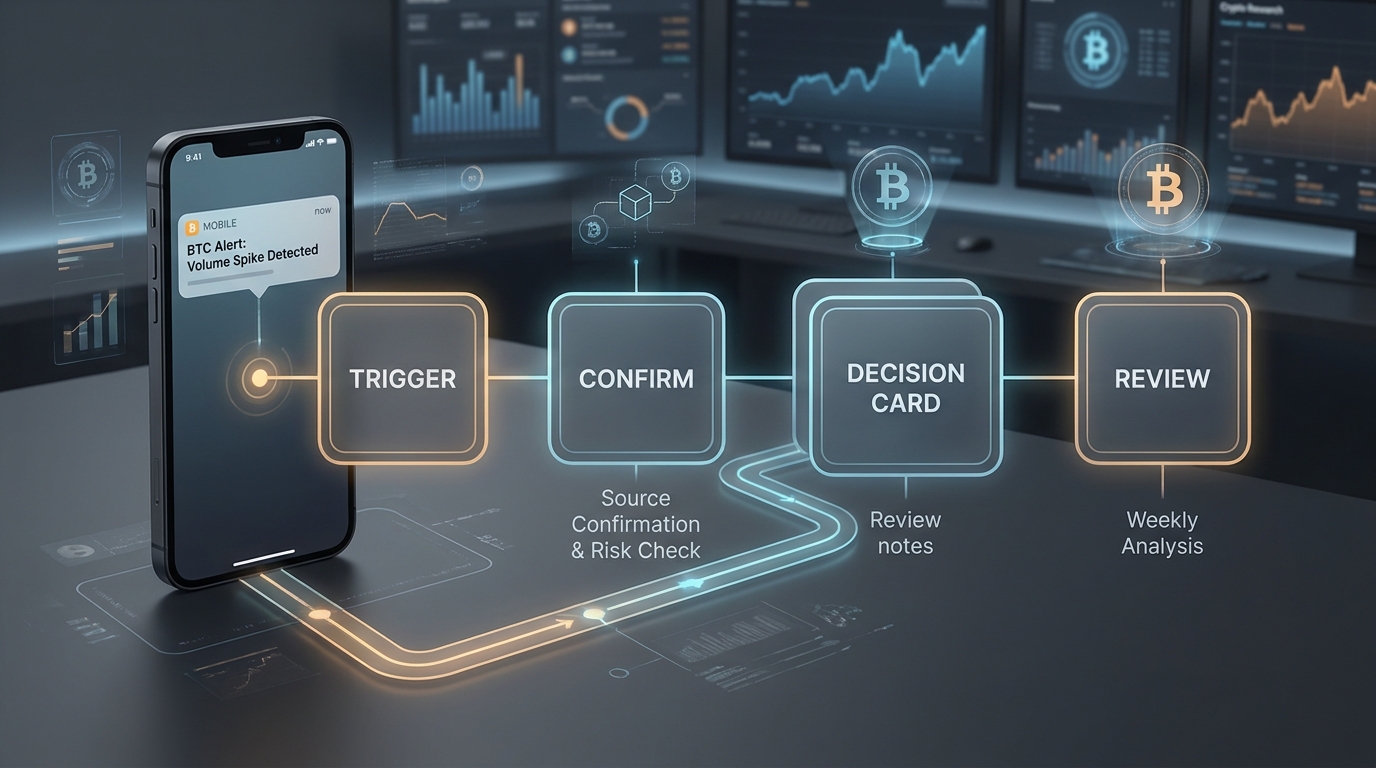
Bitcoin alerts are useful only when they change what you review next. A price ping without context is noise. A well-designed alert tells you what fired, why it matters, what needs confirmation, what risk rule applies, and whether the correct response is action, research, or no action.
This guide turns bitcoin alerts into repeatable workflows. It is written for traders, long-term holders, analysts, creators, and product teams who already know that alert tools exist and want a cleaner operating system for using them.
Important: This article is educational, not financial, legal, tax, or investment advice. A Bitcoin alert is not an instruction to buy, sell, long, short, add size, or use leverage. Crypto assets can differ materially in design, custody, liquidity, and risk.
The Short Answer
The best bitcoin alerts workflows have five parts:
| Workflow part | What it answers | Example |
|---|---|---|
| Trigger | What event fired? | BTC touched a watched level, volatility expanded, a portfolio rule changed, or a source health check failed |
| Confirmation | Is the alert supported by another source or metric? | Price structure agrees with volume, or the alert is marked unconfirmed |
| Context | Which decision does this alert support? | Review thesis, rebalance risk, check custody, update a brief, or stand down |
| Decision card | What is allowed, blocked, and unresolved? | Review only; no automatic trade; next review expires tomorrow |
| Learning loop | Did the alert improve behavior? | Useful, false positive, late, missed, stale, or unsafe |
Most bitcoin alerts tools already handle delivery. TradingView's alert documentation covers price, technical, watchlist, app, email, webhook, sound, and expiration options. Cryptocurrency Alerting lists market price, volume, volatility, exchange listing, wallet activity, Bitcoin mempool, whale, and multi-channel notification support. The gap is not notification plumbing. The gap is what happens after the notification.
BTCMind's position is different from a basic alert app: the live site describes an AI crypto research desk where six specialists run bull/bear debate, technicals, derivatives, and tail-risk analysis, then deliver an investment-grade brief to the phone. In that model, bitcoin alerts should open a research review, not leave the user alone with a buzz.
What Makes a Bitcoin Alert Useful?
A useful Bitcoin alert has a job. It is not just "BTC moved." It is "BTC moved in a way that requires this specific review."
Use this five-field alert contract:
| Field | Good version | Weak version |
|---|---|---|
| Trigger | "BTC closes outside the watched range on the selected timeframe" | "Tell me when BTC moves" |
| Owner | "Active trader reviews within 15 minutes" | "Someone checks it" |
| Confirmation | "Check source, structure, volatility, and risk note" | "Trust the alert" |
| Allowed response | "Open decision card and update thesis" | "Buy if it breaks" |
| Expiration | "Delete or rewrite after thesis invalidation" | "Leave active forever" |
This contract matters because alerts age. TradingView notes that alerts can have expiration periods, and older unused alerts may be deactivated under certain conditions. Your process should be stricter than the tool default: every important alert should have a review date, invalidation rule, or delete rule. For a faster personal setup version, use BTCMind's bitcoin alerts checklist.
Workflow 1: Price Alert to Decision Card
This is the default BTC price alerts workflow. Use it when a watched level matters, but the alert itself is not enough to act.
| Step | What to do | What to record |
|---|---|---|
| 1. Trigger | BTC reaches, crosses, or rejects a watched level | Symbol, level type, timeframe, timestamp, source |
| 2. Confirm | Check whether the move is accepted or rejected by structure | Confirmation source, contradiction, volatility state |
| 3. Risk check | Compare the move with your loss budget and exposure | Current exposure, max loss at invalidation, custody/venue risk |
| 4. Decision card | Write one sentence: act, wait, reduce risk, or no change | Decision, reason, blocked action, next review time |
| 5. Review | Mark the alert useful, late, false positive, or stale | Outcome label and rule change |
Example decision card:
Alert: BTC watched range changed.
Confirmation: Price moved, but risk note is mixed.
Allowed response: Review thesis only. No automatic trade.
Blocked response: No size increase without second-source confirmation.
Next review: End of day or after invalidation.
Outcome label: Pending.
The point is not to slow yourself down. The point is to avoid letting a simple notification become an unreviewed trade idea.
Workflow 2: Confirmation Alert for Active Traders
Active traders often need alerts that are stricter than price alone. A bitcoin alerts guide should separate the first trigger from the confirmation trigger.
Use this two-step setup:
| Alert layer | Purpose | Example rule |
|---|---|---|
| First trigger | Wake up the workflow | BTC enters watched zone |
| Confirmation trigger | Decide whether the move deserves review | Structure, volatility, volume, funding, or source check agrees |
For example, a trader might create one alert for a watched range and a second alert for a technical condition. TradingView's docs support technical alerts based on values, drawing tools, Pine indicators, strategies, and chart patterns. That does not mean the technical alert is "right." It means the tool can send the condition, while your process still needs a decision standard. If sentiment is part of the confirmation layer, pair this with BTCMind's BTC sentiment analysis workflow playbook.
The active-trader rule:
No thesis change from one alert.
No size change without confirmation.
No leverage response without a written risk card.
BTCMind can fit here as the synthesis layer. A basic alert says the condition fired. A BTCMind-style research layer should ask what the bull case says, what the bear case says, what derivatives and tail-risk evidence add, and whether the final decision should be long, short, flat, or simply "review only." That product framing must stay educational in public content: no tool can remove user judgment or market risk.
Workflow 3: Portfolio Alert for Long-Term Holders
Long-term holders usually do not need more intraday pings. They need alerts that protect the portfolio process.
Use these bitcoin alerts when the goal is portfolio hygiene:
| Alert class | Good trigger | Good response |
|---|---|---|
| Allocation drift | BTC weight leaves your written band | Review rebalance policy, not market opinion |
| Custody check | Exchange, wallet, or access assumption changes | Check withdrawal path, keys, and records |
| Thesis review | A scheduled weekly or monthly reminder fires | Update evidence snapshot and decision journal |
| Tax/recordkeeping | Transfer, sale, or venue change occurs | Record source, timestamp, wallet, and purpose |
| Risk budget | Loss at invalidation exceeds the planned limit | Reduce exposure or rewrite the risk plan before any new idea |
Investor.gov describes crypto asset custody as how and where crypto assets are stored and accessed, with wallets generally storing private keys or passcodes rather than the assets themselves. That is why custody alerts should not be treated as market signals. They belong to operational risk. For adjacent portfolio operations, see BTCMind's bitcoin portfolio tracking workflows.
Example long-term holder workflow:
- Friday review alert fires.
- Pull current allocation and wallet/exchange balances.
- Check whether BTC weight is inside the written band.
- Write a one-paragraph evidence snapshot.
- Keep, edit, or delete active price alerts based on the updated thesis.
This workflow is slower by design. It prevents a long-term holder from accidentally running an active-trader alert system.
Workflow 4: News and Source-Health Alerts
News alerts are dangerous when they outrun verification. The job of a news-related Bitcoin alert is not to be first. The job is to route uncertainty correctly.
Use this source-health ladder:
| State | Meaning | Allowed response |
|---|---|---|
| Green | Source is primary, timestamped, and consistent with other evidence | Summarize and route to the right review |
| Yellow | Source is credible but incomplete, delayed, or missing context | Monitor; avoid directional language |
| Red | Source conflict, social rumor, or unclear provenance | Do not publish, trade, or push urgency |
| Blackout | Source unavailable or suspected manipulation | Freeze automation and escalate |
Example:
Alert: Bitcoin custody headline is circulating.
Source health: Yellow.
Allowed response: Create a monitoring note and link to custody education.
Blocked response: No directional price copy. No urgency push.
Escalation: Recheck primary source before any user-facing update.
This is especially important for public content, newsletters, social posts, and community alerts. An alert that is useful inside a private research workflow may be irresponsible as public copy.
For a growth or product team version of this problem, BTCMind's bitcoin alerts funnel-stage workflow maps alert classes to awareness, consideration, signup, activation, retention, and risk review.
Workflow 5: Tool Evaluation for Bitcoin Alerts Tools
When comparing bitcoin alerts tools, do not start with the longest feature list. Start with the workflow you need.
| Evaluation question | Why it matters |
|---|---|
| Which alert classes are supported? | Price-only tools solve a different problem from tools with technical, wallet, volatility, webhook, or source alerts |
| Which delivery channels are supported? | Mobile push, email, webhook, Slack, Telegram, Discord, or SMS fit different users |
| Can alerts be named and annotated? | Notes turn a trigger into a reusable decision record |
| Can alerts expire or disable after firing? | Stale alerts are a common source of noise |
| Can the tool log outcomes? | Without outcomes, you cannot learn which alerts are useful |
| Can it route to a research brief or dashboard? | The best alert opens the next review surface |
| Can it suppress unsafe or unconfirmed alerts? | Source conflicts and leverage-related alerts need gates |
| Can it export or integrate data? | Webhooks and APIs matter for teams and advanced workflows |
| Does it separate education from advice? | Public-facing alerts should avoid implied recommendations |
| Is the workflow understandable on mobile? | Bitcoin moves 24/7; the review needs to work away from a desk |
Cryptocurrency Alerting is a useful example of the feature-list pattern: it presents many alert classes and many notification channels. TradingView is a useful example of chart-native alert mechanics. BTCMind should not try to win this article by claiming more alert plumbing. The stronger angle is alert-to-research synthesis: a trigger opens a brief, contradiction check, risk note, and decision card. For the broader research workflow around those alerts, start with the Bitcoin market intelligence beginner guide.
Five Bitcoin Alerts Examples
Use these examples as operating patterns, not trading instructions.
| Example | Trigger | Confirmation | Decision output |
|---|---|---|---|
| Watched range review | BTC enters a pre-defined range | Structure and volatility check | Review thesis; no automatic action |
| Breakout quality check | BTC moves outside a range | Acceptance, volume, and contradiction review | Update decision card or mark false break |
| Portfolio drift review | BTC allocation exits written band | Portfolio records and risk budget | Rebalance review, not price prediction |
| Custody event check | Exchange, wallet, or withdrawal assumption changes | Primary source and account access check | Operational risk note and support path |
| News source-health check | High-attention Bitcoin headline appears | Primary source, timestamp, and conflict scan | Green/yellow/red source status |
Here is a complete example record:
Alert name: BTC watched range review
Trigger class: Price
Owner: Trader or analyst
Confirmation needed: Structure, volatility, and source timestamp
Allowed response: Open decision card
Blocked response: Automatic size increase
Expiration: Delete if thesis changes or after weekly review
Outcome labels: Useful, false positive, late, missed, stale, unsafe
Notice that the example does not require a forecast. It requires a record.
A 20-Minute Bitcoin Alerts Setup Workflow
Use this setup before adding another alert.
| Minute | Task | Output |
|---|---|---|
| 0-3 | Pick one decision the alert supports | Market review, portfolio review, custody check, or source check |
| 3-6 | Choose the trigger class | Price, technical, volatility, wallet, news, portfolio, or source health |
| 6-9 | Write the confirmation rule | What must agree before the alert matters? |
| 9-12 | Write the blocked response | What must not happen when the alert fires? |
| 12-15 | Set owner, channel, and urgency | Mobile push, email, webhook, dashboard, or team channel |
| 15-18 | Add expiration | Date, invalidation, one-time trigger, or weekly review |
| 18-20 | Add outcome labels | Useful, false positive, late, missed, stale, unsafe |
If you cannot fill those fields, you probably do not need the alert yet.
The Weekly Alert Review
The weekly review is where bitcoin alerts become a system.
| Review question | Keep/edit/delete rule |
|---|---|
| Did the alert change a useful review? | Keep |
| Did it fire but add no new information? | Tighten or delete |
| Did it fire too late? | Move trigger earlier or change source |
| Did a material event happen with no alert? | Add a missing-event rule |
| Did it fire after the thesis changed? | Delete as stale |
| Did it create unsafe urgency? | Rewrite copy and add a risk gate |
The KPI is not "number of alerts." The KPI is "number of alerts that led to a useful, logged review."
Where BTCMind Fits
BTCMind is not positioned as another notification-only tool. Its homepage describes a mobile AI crypto research desk with six specialists, bull/bear debate, technicals, derivatives, tail-risk, Portfolio Manager calls, price alerts, voice chat, and OKX-native execution.
That makes the defensible BTCMind angle clear:
| Basic alert workflow | BTCMind-style research workflow |
|---|---|
| Alert fires | Alert opens a structured review |
| User checks charts alone | Multiple evidence lanes are summarized |
| One view dominates | Bull and bear cases are compared |
| Risk is handled manually | Tail-risk and portfolio context are part of the brief |
| Outcome is forgotten | Decision card and review loop preserve learning |
The CTA should be narrow and honest: use BTCMind when a Bitcoin alert needs a traceable research brief, not when you want a black-box signal or guaranteed outcome.
FAQ
What are bitcoin alerts?
Bitcoin alerts are notifications that fire when a defined Bitcoin-related condition occurs, such as price, technical, volatility, wallet, news, portfolio, or source-health changes.
Are BTC price alerts enough?
BTC price alerts are useful for waking up a review, but they are usually not enough for a decision. Add confirmation, risk context, and an expiration rule.
What is the best bitcoin alerts workflow for beginners?
Beginners should start with one watched-level alert, one portfolio review alert, and one weekly cleanup routine. Avoid stacking many alerts before you know which ones change behavior.
How should teams use bitcoin alerts?
Teams should assign each alert an owner, allowed response, blocked response, escalation path, and outcome label. This prevents alert spam and unsafe public copy.
How does BTCMind improve bitcoin alerts?
BTCMind can turn a trigger into a research review by connecting alerts to multi-agent analysis, bull/bear debate, technicals, derivatives, tail-risk, and mobile briefs. It should still be used as research support, not a substitute for judgment.
Final Takeaway
The best bitcoin alerts do not promise certainty. They create a cleaner loop:
Trigger -> Confirm -> Context -> Decision card -> Review -> Rule updateIf your alert cannot name the decision it supports, it is probably just noise. If it can name the decision, confirmation rule, blocked response, and expiration date, it becomes part of a real Bitcoin research workflow.
Use BTCMind when you want a Bitcoin alert to open a traceable research brief instead of another isolated notification.